Hyper-V vs. VMware vs. Azure Local (and Others): 2026 Comparison and Migration Guide
For years, comparing Hyper-V vs. VMware was a predictable debate over licensing fine print and minor feature gaps. But in 2026, the landscape has fundamentally shifted. Following Broadcom’s licensing restructuring, some organizations face astronomical renewal costs, forcing a massive, high-stakes migration wave.
Whether you’re executing a VMware-to-Hyper-V migration, exploring Microsoft’s rebranded hybrid powerhouse Azure Local (formerly Azure Stack HCI), or looking at open source alternatives, the decision is no longer just “which hypervisor is better.” The real 2026 decision set requires weighing post-Broadcom cost pressures against modern hybrid cloud architecture.
This guide breaks down your best paths forward, digging into the nuances of Azure Local combinations and also comparing the legacy giants with today’s other, newer alternatives: Proxmox, Nutanix, and XCP-ng.
First, let’s look at how what may be the biggest news event in virtualization history has changed things.
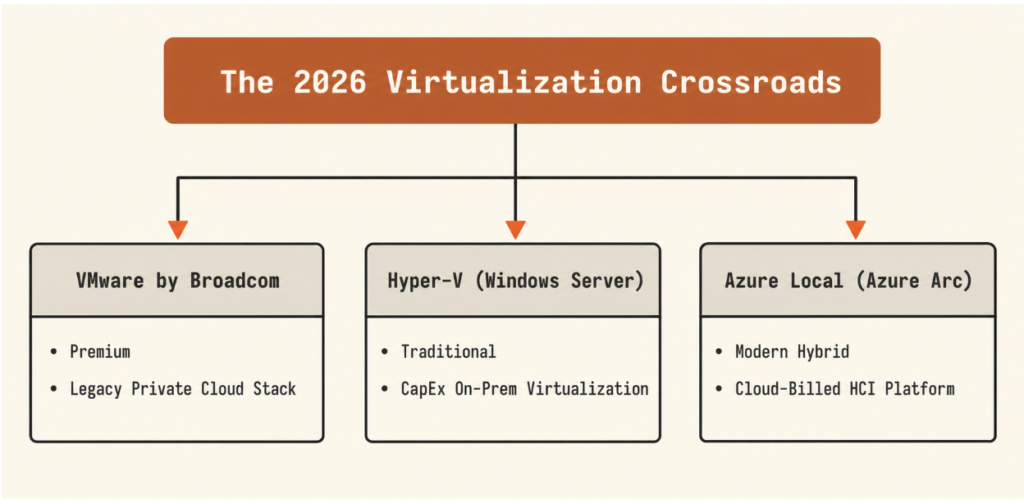
Figure 1: The 2026 Virtualization Crossroads — VMware by Broadcom vs. Hyper-V vs. Azure Local.
Overview of VMware by Broadcom
Pioneering virtualization since 1998, VMware, officially rebranded as VMware by Broadcom, remains the gold standard for enterprise virtualization. Its vSphere platform has evolved into one of the most reliable, feature-rich private cloud environments available.
Like Hyper-V, ESXi (VMware’s core hypervisor) is a Type 1 bare metal hypervisor renowned for its high performance, robust security, and deep resource management capabilities. Historically, the VMware ecosystem was highly modular, allowing organizations to purchase standalone licenses for vSphere, vSAN (storage), and NSX (networking) as needed.
The 2026 VMware subscription bundles: VCF vs. VVF
Under Broadcom’s restructured model, standalone product licensing is gone. Virtually all deployments have been consolidated into two primary per-core subscription packages:
- VMware Cloud Foundation (VCF): This is Broadcom’s flagship, enterprise-grade private cloud suite. It’s a complete, tightly integrated software-defined data center (SDDC) stack that bundles vSphere (compute), vSAN (storage), NSX (networking), and the Aria Suite (advanced management and automation). VCF is built for large-scale and rapid hybrid-cloud deployments.
- VMware vSphere Foundation (VVF): Positioned as the mid-market and standard enterprise offering, VVF focuses primarily on core compute virtualization. It packages vSphere, vSphere Kubernetes Service (formerly Tanzu Kubernetes Grid), and basic operations management, along with a limited, trial-sized capacity of vSAN storage (typically capped per core).
(Note: Bare-bones vSphere Standard is still offered for basic workloads, but it lacks the advanced storage and management capabilities of the Foundation suites).
The Broadcom effect: What changed with VMware licensing?
If your organization is approaching a virtualization renewal, you’re likely facing a drastically different commercial reality. Since Broadcom completed its acquisition of VMware, it has introduced major licensing changes that have left many IT teams facing higher costs and increased pressure to evaluate alternatives.
The disruption comes down to four fundamental shifts:
1. The end of perpetual licenses
The era of buying a VMware license once and running it indefinitely with optional Support and Subscription (SnS) is over. Broadcom has discontinued perpetual licensing. Once your current SnS contract expires, you must either transition to a recurring subscription or run unsupported without security patches, upgrades, or technical assistance.
2. Mandatory, high-cost ‘all-or-nothing’ bundles
To simplify its catalog and drive revenue, Broadcom consolidated dozens of granular, standalone products into rigid subscription bundles.
- Granular options are gone. If you want advanced features, you need VMware Cloud Foundation (VCF).
- VCF forces you to pay for the “full stack,” including compute (vSphere), storage (vSAN), networking (NSX), and management (Aria), regardless of whether you actually use or need those individual components.
3. Core licensing shifts and minimums
Licensing has shifted from a per-CPU socket model to a per-core subscription model. This transition is accompanied by costly constraints:
- The 16-core socket minimum: Every physical CPU socket requires a minimum of 16 licensed cores.
- The 72-core contract minimum: Broadcom implemented a strict minimum purchase threshold of 72 cores per contract. Small-to-medium enterprises (SMEs) or edge deployments with low-core physical servers often see their licensing requirements (and costs) increase significantly for the exact same physical hardware.
- Late renewal surcharges: Missing your contract anniversary date triggers a 20% surcharge on your first-year subscription cost with no grace period.
4. Partner ecosystem disruption
Broadcom ended VMware’s legacy partner programs, eliminating thousands of smaller, regional distributors and resellers to focus strictly on top-tier “Pinnacle” and “Premier” partners. For mid-market businesses, this means the trusted local IT providers who managed their VMware environments for years may no longer have direct access to deal registration or specialized discounts, driving up procurement friction and costs.
The bottom line
With average renewal costs increasing anywhere from 2X to 12X, the Broadcom effect has transformed virtualization from a routine infrastructure utility into an active financial liability.
This pressure is the primary driver behind the wave of migrations toward Hyper-V and the adoption of modern hybrid alternatives like Azure Local, which we’ll get into now.
Overview of Hyper-V
Microsoft introduced Hyper-V in 2008 as a native hypervisor, seamlessly integrated into Windows Server. Since then, it has been a core component of every Windows Server release, including Windows Server 2025, as well as desktop Pro, Enterprise, and Education editions.
As a Type 1 hypervisor, Hyper-V runs directly on the bare metal hardware rather than as an application inside an operating system. This architecture ensures high-speed performance, low overhead, and efficient physical resource allocation.
The licensing advantage: ‘Included’ virtualization
One of Hyper-V’s biggest advantages in 2026 is its licensing model. Unlike VMware’s post-Broadcom per-core subscription bundles, Hyper-V licensing is built directly into Windows Server:
- Windows Server Standard Edition includes virtualization rights for up to two VMs per licensed host.
- Windows Server Datacenter Edition grants unlimited VM rights on licensed host hardware.
If your organization already licenses Windows Server for its workloads, Hyper-V is essentially “free” virtualization, completely bypassing separate hypervisor licensing fees. Additionally, Microsoft’s flexible licensing models now include pay-as-you-go subscription licensing via Azure Arc, allowing organizations to pay for Windows Server on a flexible, per-core monthly basis without needing upfront perpetual licenses.
Key features of Hyper-V
To compete in a highly demanding market, Hyper-V features deep native integration with the Microsoft ecosystem, robust clustering, and cloud-management capabilities:
- Nested virtualization: Enables you to run virtual machines inside other virtual machines. This is a critical feature for DevOps pipelines, software testing, and mimicking multi-node configurations on a single physical host.
- Dynamic memory: Intelligently reclaims and reallocates RAM across running VMs in real time based on active workload demands, preventing wasted memory overhead.
- Live migration: Allows you to move running VMs between physical clustering hosts with zero downtime or service interruption, ensuring seamless hardware maintenance.
- Azure Arc integration: Windows Server and Hyper-V feature deep native integration with Azure Arc, Microsoft’s platform for managing resources that don’t live in Azure as if they do. By onboarding your Hyper-V hosts to Azure Arc, you can manage on-premises VMs directly from the Azure Portal. This unlocks cloud-native capabilities on premises—including centralized patch management, Azure Monitor, policy governance, and even no-cost Hotpatching (which allows you to apply security patches to Windows Server 2025 VMs in memory without rebooting).
Overview of Azure Local
If Windows Server Hyper-V is Microsoft’s traditional approach to virtualization, Azure Local is its modern, cloud-native successor. Rebranded from Azure Stack HCI, Azure Local is a purpose-built, hyperconverged infrastructure (HCI) operating system designed to run virtual machines, containerized applications, and cloud services directly on your physical on-premises hardware.
Under the hood, Azure Local still utilizes the Hyper-V hypervisor engine and Storage Spaces Direct (S2D). However, it strips away traditional Windows Server roles (like Active Directory, print servers, or DNS) to function as a lean, high-performance hybrid virtualization host.
Key features of Azure Local
- Native Azure Arc control plane: Unlike standard hypervisors managed via local desktop apps, Azure Local is cloud native. It installs with an integrated Azure Arc resource bridge, turning your physical local servers into an extension of the public cloud. You can provision, resize, patch, and delete on-premises VMs directly through the Azure Portal web browser, or by using cloud-standard tools like Bicep, Terraform, and the Azure CLI.
- Hyperconverged (and disaggregated) storage: Azure Local naturally leverages local server NVMe and SSD storage to create a highly resilient, ultra-fast software-defined storage pool. However, to directly compete with premium SAN architectures, it also supports disaggregated SAN deployments—allowing organizations to attach enterprise Storage Area Networks and scale their compute nodes independently past traditional 16-node limits.
- Integrated Azure Kubernetes Service (AKS): Container management is baked into the platform. You can run traditional monolithic VMs side by side with localized AKS container clusters managed seamlessly under one cloud roof.
- Hardware-accelerated AI workloads: Azure Local features mature support for GPU acceleration (via GPU partitioning or Discrete Device Assignment), allowing local virtual machines to leverage enterprise hardware like NVIDIA L-series and Blackwell GPUs for localized AI models and heavy graphic processing.
- Sovereign and disconnected operations: For environments with strict data privacy laws or flaky internet, Azure Local features a Sovereign Private Cloud stack. It can run in completely “disconnected” or air-gapped modes—keeping your local mission-critical workloads, compliance policies, and even Microsoft 365 Local services running autonomously without constant cloud connectivity.
The Azure Local consumption model
Azure Local changes how virtualization is bought. Rather than purchasing permanent software licenses upfront, it operates on an operating expense (OPEX) utility model billed directly to your monthly Azure account, and pricing for external storage is still in flux.
The hybrid catch: While the host operating system is subscription-billed, guest operating system licenses (like Windows Server or Red Hat Linux running inside the VMs) are managed separately. If you already own Windows Server Datacenter licenses with Software Assurance, you can apply Azure Hybrid Benefit to waive the guest VM licensing fees, making it a highly cost-effective destination for migrating off VMware.
Comparing Hyper-V, VMware, and Azure Local
Integration and compatibility
In 2026, compatibility is less about whether a hypervisor can run an operating system (all three handle Windows and Linux flawlessly) and more about cloud integration, containerization, and lock-in avoidance.
Hyper-V (Windows Server): The traditional Microsoft engine
- OS support: Hyper-V has run enterprise Linux workloads (like Red Hat, Ubuntu, and Rocky Linux) with native, high-performance integration services baked directly into the Linux kernel for years.
- Cloud strategy: Hyper-V is highly optimized for organizations leveraging Azure Arc. If you want a consistent operating experience between your physical servers and the public cloud, Microsoft provides a seamless, unified control plane.
- Containerization: To run Kubernetes, standard Hyper-V relies on you manually provisioning and managing your own Linux virtual machines to act as container hosts, or using third-party distributions.
Azure Local: The cloud-native hybrid platform
- OS support: Because it shares the core Hyper-V hypervisor, it runs Windows and Linux workloads with bare metal efficiency. However, it completely strips away traditional Windows Server roles to function purely as an optimized cloud-host OS.
- Cloud strategy: Azure Local is an extension of the cloud. It features native, out-of-the-box infrastructure projection via Azure Arc. You manage, configure, and scale your on-premises hardware directly from a web browser inside the Azure Portal using Azure Resource Manager (ARM).
- Containerization: It features native, turn-key integration for AKS on premises. There’s no control-plane licensing premium for AKS on Azure Local; container clusters cost only the underlying host cores you’re already paying for.
VMware by Broadcom: The multi-cloud standard
- OS support: VMware’s guest OS support remains the broadest in the industry, maintaining highly mature templates for legacy operating systems, specialized Linux distributions, and even macOS (under specific hardware licensing).
- Cloud strategy: Through VMware Cloud Foundation (VCF), Broadcom offers deep integration with AWS, Azure, and Google Cloud. However, running VMware software on these public clouds now requires bringing your own expensive Broadcom subscription licenses (BYOL), making multi-cloud architectures significantly more expensive than they were a few years ago.
- Containerization: Container management is natively integrated into the virtualization layer via the vSphere Kubernetes Service, allowing IT operators to spin up and manage Kubernetes clusters side by side with traditional VMs using the familiar vCenter console.
2026 takeaway: If you want a tight, cost-effective on-premises-to-Azure pipeline, Microsoft is the clear winner. If you run a highly diverse, multi-cloud environment with legacy operating systems and have the budget to sustain it, VMware remains highly flexible.
Security features
All three platforms deliver enterprise-grade security, but their focus splits between cloud-backed governance, rigid hardware baselines, and full-stack software isolation.
Hyper-V security: Active local protection
Hyper-V uses virtual Trusted Platform Modules (vTPMs) to support Secure Boot and BitLocker encryption inside virtual machines, protecting them from virtual disk theft. While Shielded VMs (which encrypt VM data to protect it from compromised host administrators) are still supported, Microsoft has largely transitioned its development focus toward Azure Confidential Computing and hardware-enforced enclave security. Standard Hyper-V hosts can be hooked into Microsoft Defender for Endpoint manually or via basic Arc connection to stream hypervisor and guest OS security telemetry.
Azure Local security: Zero-trust by default
Azure Local is a “secure-by-default” operating system, shipping with over 300 security settings and explicit application control baselines strictly enabled right from the deployment phase. Built-in drift protection mechanisms continuously monitor your hardware, firmware, and hypervisor configurations. If a local administrator alters a security baseline, the platform flags it inside the Azure Portal and can automatically remediate the drift. Native, deep agent integration means advanced threat defense, automated vulnerability scanning, and SIEM data forwarding are built directly into the cluster infrastructure layer.
VMware security: Cryptographic attestation and Carbon Black
vSphere Trust Authority provides cryptographic attestation for the entire cluster, ensuring that only trusted hardware, firmware, and hypervisors can run sensitive workloads.
With the deprecation of legacy tools like AppDefense, VMware has deeply integrated Carbon Black Workload directly into vSphere. It monitors VM behavior, detects anomalous processes, and can trigger network isolation via NSX to stop lateral threats in real time.
VM-level encryption, core dump encryption, and secure boot are robustly supported, but securing the entire virtualized network fabric relies heavily on having the NSX security features bundled into the premium VCF tier.
Architectural and feature comparison matrix
The virtualization decision in 2026 isn’t just a comparison of raw hypervisor engines; it’s a choice between three distinct operational models. The breakdown below details how traditional Windows Server Hyper-V, Azure Local, and VMware by Broadcom stack up across core architectural features.
| Feature | Hyper-V (Windows Server) | Azure Local | VMware by Broadcom (VVF/VCF) |
| Hypervisor Type | Type 1 (bare metal) | Type 1 (optimized Hyper-V kernel) | Type 1 (ESXi) |
| Operational Model | Traditional, isolated on-premises data center | Cloud-managed, hyperconverged infrastructure (HCI) | Dedicated private cloud software stack |
| Primary Management Tool | Windows Admin Center, Hyper-V Manager, Failover Cluster Manager | Azure Portal (ARM/Bicep), with Windows Admin Center for node diagnostics | vCenter Server (natively bundled) |
| Scale Limits | Up to 64 nodes per cluster | Up to 16 nodes per cluster | Up to 64 nodes (vSAN) or 96 nodes (SAN) |
| Live Workload Mobility | Live migration (included, manual or cluster-based orchestration) | Live migration (orchestrated natively via Azure Arc and local failover) | vMotion (highly advanced, automated cross-cluster/vCenter mobility) |
| Storage Integration | Flexible: Supports traditional external SAN/NAS or Storage Spaces Direct (S2D) | Native HCI via S2D (pools local NVMe/SSD) or specialized disaggregated SAN arrays | vSAN (software-defined storage, kernel-integrated but requires high-tier bundling) |
| Nested Virtualization | Yes | Yes | Yes |
| Resource Allocation | Dynamic memory, static weights | Dynamic memory, optimized host balancing | Advanced DRS (continuous, automated vMotion load balancing) |
| High Availability (HA) | Failover clustering (configured manually with quorum/witness) | Automated cloud-enforced HA (extends cluster logic via Azure policies) | Policy-driven HA (advanced VM restart priorities, admission control) |
| Disaster Recovery | Hyper-V Replica, Azure Site Recovery | Azure Site Recovery (cloud-native integration), stretch clusters | Live Site Recovery (formerly SRM), vSphere Replication |
| Native Kubernetes | No (requires manual VM provisioning and standalone cluster setup) | Yes (built-in AKS) with zero control-plane licensing fees | Yes (vSphere Kubernetes Service) baked into the base foundation packages |
Support and community
The support experience for these platforms has undergone a divergence, driven primarily by corporate restructuring and cloud alignment.
Hyper-V support: The traditional IT ecosystem
Microsoft offers a highly accessible support system. Because Hyper-V is built into Windows Server, standard Microsoft Unified Support covers your virtualization stack. The community is massive, highly collaborative, and deeply integrated with the broader Windows and Azure ecosystems. Troubleshooting resources, forums, and scripts are abundant and freely accessible to IT professionals of all levels.
Azure Local support: Unified cloud escalation
Support for Azure Local bypasses traditional Windows Server channels. Because it’s an active Azure service, technical support tickets are opened directly through the Azure Help + Support portal. Microsoft cloud engineers handle the host OS, Azure Arc control plane, and Azure-provided extensions collectively. While growing rapidly due to the post-Broadcom migration wave, the Azure Local community is highly cloud-centric, drawing heavily from enterprise DevOps, hybrid-cloud architects, and specialized hardware OEM implementation teams.
VMware by Broadcom: Dedicated but enterprise-segmented
Broadcom has heavily restructured VMware’s support delivery. Under the new model, support is bundled with the VCF and VVF subscriptions. Because Broadcom terminated the vast majority of smaller, regional VMware reseller partnerships to focus on top-tier enterprise accounts, mid-market customers often experience longer wait times and must navigate direct Broadcom support portals without the help of a local, dedicated partner. The VMware user community (VMUG) remains one of the most passionate and highly skilled technical communities in IT history. However, the pool of certified VMware professionals is experiencing shifts as many engineers actively cross-train in Hyper-V, Azure, and open source alternatives like Proxmox.
Pricing
Virtualization costs are no longer apples-to-apples. The final choice often comes down to capital expenditures (CAPEX) versus operational, utility-billed cloud expenses (OPEX). Here is approximate pricing.
| Pricing Component | Hyper-V (Windows Server 2025) | Azure Local (HCI) | VMware by Broadcom (VVF/VCF) |
| Billing Model | Traditional license + software assurance (CAPEX) | Monthly cloud subscription billed to Azure (OPEX) | Annual/multi-year subscription contract (OPEX/CAPEX) |
| Metrics | Per physical core (minimum 16 cores/server) | Per physical host core | Per physical core (minimum 16 cores/CPU) |
| Base Host Pricing | Included with Windows Server ($0 extra if OS is licensed) | $10/core/month (hyperconverged S2D) $20.10/core/month (disaggregated SAN) |
vSphere Foundation (VVF): ~$35–$50/core/year Cloud Foundation (VCF): ~$350+/core/year (Est. enterprise list) |
| Guest VM Rights | Standard: Up to 2 Windows VMs Datacenter: Unlimited Windows VMs |
Optional add-on: $23.30/core/month for unlimited Windows Server guests | N/A (guest OS licenses must be purchased entirely separately via Microsoft) |
| The “Cloud Trap”/Discounts | No active cloud connection required. Traditional volume discounts apply | Azure Hybrid Benefit (AHB): If you own Windows Server Datacenter with SA, host and guest fees can drop to $0/month | Eliminates all perpetual assets. Rigid SKU bundling forces payment for unused features (vSAN/NSX) |
The core decision set in 2026
1. The legacy status quo: VMware by Broadcom
- The deal: You stay on ESXi/vSphere. You get deep, mature virtualization features (like DRS) and high performance, but you must absorb the price increases of Broadcom’s all-or-nothing software bundles (VCF/VVF).
- The fit: Highly complex environments with massive budgets that are deeply integrated into VMware’s automation ecosystem.
2. The traditional on-premises alternative: Windows Server Hyper-V
- The deal: You buy traditional Windows Server licenses (Standard or Datacenter) and turn on the Hyper-V role. You manage it locally via Hyper-V Manager, Failover Cluster Manager, or SCVMM. You plug it into your existing traditional SAN.
- The fit: Organizations that want a traditional capital expense (CAPEX) model, want to keep their existing non-HCI storage hardware, and want a low-cost, predictable alternative to Broadcom with zero cloud requirements.
3. The cloud-connected HCI alternative: Azure Local
- The deal: You deploy a dedicated hyperconverged infrastructure platform on validated partner hardware. Instead of buying Windows Server software licenses, you pay a monthly per-core subscription fee billed straight to your Azure portal ($10/physical core/month). You manage your on-premises virtual machines directly from the cloud using Azure Arc.
- The fit: Organizations doing a full hardware refresh, those looking to replace traditional SANs with modern hyperconverged storage (Storage Spaces Direct), and teams that want an operational model that acts exactly like Microsoft Azure but runs physically inside their own server room.
Other options: Proxmox, Nutanix, and XCP-ng
While the Microsoft stack captures a massive chunk of displaced VMware workloads, it isn’t the only destination. A growing number of enterprises are opting for open source flexibility or dedicated hyperconverged infrastructure (HCI) alternatives to regain financial control.
1. Proxmox VE: The open source mid-market hero
Proxmox Virtual Environment (VE) has graduated from homelabs to a legitimate enterprise replacement for VMware vSphere. Based on Debian Linux, it integrates the high-performance KVM hypervisor and lightweight LXC containers into a single, unified platform.
- The Proxmox Datacenter Manager (PDM): Released in late 2025, PDM functions as Proxmox’s answer to vCenter. It provides a clean, single pane of glass to manage multi-cluster environments across separate data centers.
- The financial appeal: Proxmox is entirely open source and free to download. However, production environments rely on the Proxmox Enterprise Subscription, which provides access to heavily tested stable repositories and vendor technical support. Crucially, it is billed per physical CPU socket, bypassing Broadcom’s punitive per-core minimums.
- Storage flexibility: It features native, out-of-the-box support for high-performance file systems like ZFS and integrated Ceph software-defined storage, mimicking many core capabilities of VMware vSAN.
- The catch: While its built-in ESXi import wizard makes migration straightforward, Proxmox demands strong in-house Linux scripting expertise. If your team relies heavily on turnkey enterprise ecosystems or extensive third-party automation tools, you’ll face an adaptation learning curve.
When it comes to the backup ecosystem, unlike other hypervisors that force you into expensive third-party tools, the Proxmox Backup Server (PBS) offers enterprise-grade deduplication, encryption, and incremental backups natively integrated into the cluster layer.
2. Nutanix (AHV): The premium enterprise powerhouse
If Proxmox is the choice for cost-conscious mid-market setups, Nutanix is the logical destination for massive, complex enterprise environments that want to move away from Broadcom but keep premier corporate backing.
- Nutanix Cloud Infrastructure (NCI) and AHV: Nutanix operates on its own Acropolis Hypervisor (AHV), built on a highly customized KVM foundation. It represents an operational model shift away from VMware’s complex, distributed dependency tree toward localized cluster authority—meaning individual nodes and clusters maintain complete operational resilience even if upstream management planes fail.
- Predictable licensing: While still a premium-tier enterprise software product, Nutanix has capitalized heavily on Broadcom migrations by offering modular, capacity-based licensing. You license what your infrastructure footprint actually uses rather than being penalized by rigid transistor or physical core minimums.
- Nutanix Move: To facilitate the migration wave, the platform includes the Nutanix Move toolkit, which automates the agentless cross-platform migration of VMs from ESXi to AHV with negligible cutover downtime.
- The catch: Nutanix is not cheap. While it undercuts post-acquisition VMware costs and offers much better stability, it requires a significant capital commitment and a potential redesign of deep network microsegmentation topologies if you previously relied heavily on VMware NSX.
3. XCP-ng: The Xen ecosystem drop-in
XCP-ng (Xen Cloud Platform – next generation) is a fully open source, bare metal Type 1 hypervisor based directly on the classic XenServer architecture.
- Xen Orchestra (XO): The platform is managed via Xen Orchestra, a comprehensive web administration appliance. XO includes a powerful V2V (VMware-to-Vates) migration engine that allows for streaming, agentless warm migration of live virtual machines directly out of VMware environments into XCP-ng.
- Architectural progress: The platform has matured dramatically, with the modern QCOW2 storage format hitting general availability (GA), introducing high-performance snapshots, fast online coalescing, and built-in virtual disk compression.
- The appeal: XCP-ng is a true drop-in architectural replacement for teams that love the classic structural partitioning of traditional hypervisors but want an active, open source development path supported by a reliable corporate backing entity (Vates) providing SLA-driven production support.
2026 alternatives decision matrix
To wrap up your strategic review, use this baseline breakdown to filter your options outside the Microsoft ecosystem:
| Platform | Best Suited For | Key Strength | Main Tradeoff |
| Proxmox VE | SMBs, mid-market enterprises, and heavy dev/test environments | Cost disruptive per-socket pricing, native LXC container options | Demands a strong hands-on culture and solid Linux admin skills |
| Nutanix (AHV) | Large, regulated enterprises requiring premium 24X7 vendor backing | Elite localized cluster resilience, seamless automated migration via Move | High initial investment; a premium enterprise software tool |
| XCP-ng | Teams looking for an open-source, classic hypervisor layout | Excellent Xen Orchestra management plane and robust warm V2V migration | Smaller third-party ecosystem compared to KVM or Hyper-V variants |