Summary
Everpure enhances Nutanix infrastructure beyond block storage by delivering unified file, object, and Kubernetes-native data management for modern enterprise workloads.


In late 2025, the integrated solution combining Nutanix Cloud Platform (NCP) and Everpure™ FlashArray™ became generally available. The solution deeply integrates FlashArray storage functionality into the core of the Nutanix platform. Storage functionality is fully offloaded (volumes, snapshots, cloning, etc.), but entirely managed within Nutanix Prism, giving users the value of Purity software and the same day-to-day management experience Nutanix users are used to. This is not just a simple integration. It’s a true co-engineering of the platforms into a seamless stack, preserving the look, feel, and experience of HCI, but with the value proposition of external storage.
This solution has had an interesting side effect: People have assumed they can’t use any storage with Nutanix unless it’s deeply integrated into the Nutanix stack. While this is certainly the best path for day-to-day block storage management for your VMs, it is not the only path, and block is not the only way to consume storage. For many use cases, it isn’t even the preferred path.
Data is consumed in different ways at different layers of a technology stack. File, object, and block all have different use cases and methods for control. Increasingly, storage consumption is heavily being driven at the application layer where the need to store and access massive unstructured data sets has become the primary driver for storage growth. These range from traditional use cases such as shared content repositories or user space to modern initiatives like AI inferencing or Kubernetes-deployed apps. The key point is that while most, if not all, of your infrastructure is running on VMs, the virtualized infrastructure is not the only touchpoint to your storage.
That’s where the Enterprise Data Cloud (EDC) becomes strategic. The combined Unified Data Plane that is made up of FlashArray, FlashBlade®, Everpure Cloud, and Portworx® attacks these data problems from all vectors. The EDC can provide consistent enterprise storage services across Nutanix HCI clusters, disaggregated compute deployments, Nutanix Cloud Cluster (NC2) environments, Kubernetes platforms, and AI infrastructure.
Let’s dig into the many ways that our Unified Data Plane combines with the Nutanix Cloud Platform to solve all storage needs.
Shared file and object storage across Nutanix environments
Not every workload needs block storage, and increasingly, much of the most important data does not belong to a single virtual machine at all. One or more VMs and their apps are consumers of that data, not exclusive owners. AI data sets, VDI user shares, backup repositories, home directories, analytics pipelines, legal documents, media libraries, archive data, and shared application content all live in the world of files and objects. None of these things generally exist on a traditional virtual disk.
Everpure FlashArray and FlashBlade can provide these services directly to workloads running across Nutanix environments, including Nutanix HCI clusters and Nutanix compute-only nodes. Because the access method is native file or object storage over the network, virtual machine operating systems and/or their hosted applications can directly consume NFS exports, SMB shares, or S3 buckets without requiring direct Nutanix storage integration. That makes the same data set available to workloads running in different places without forcing the data to be copied, replicated, or tied to a single Nutanix cluster.
This is also not limited to a single protocol or a single use case at a time. In many environments, these workflows run in parallel. A single Everpure storage platform can support SMB shares for user data, NFS exports for application and analytics workloads, and access to S3 buckets at the same time. That matters because unstructured data rarely fits neatly into one access model.
Home directories and VDI user shares are good examples. The virtual desktop may be non-persistent, but the user’s data is not. User shares and persistent user data can be centralized on FlashArray or FlashBlade file services and accessed by desktops or application servers running on Nutanix. This gives the environment a common place to protect, replicate, and recover user data without tying it to an individual VM lifecycle.
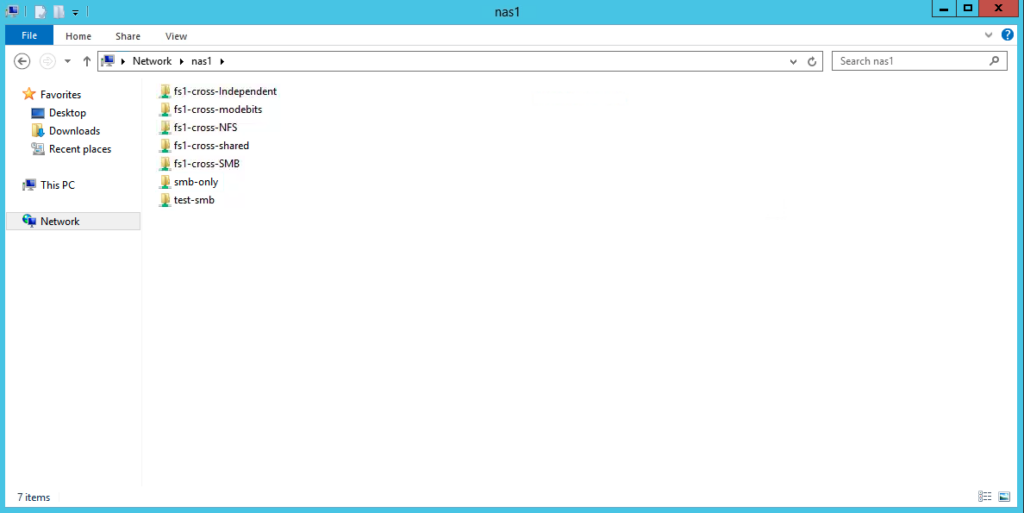
Figure 1: Basic file connectivity via SMB or NFS is available from both FlashArray and FlashBlade.
AI and analytics are another natural fit. Platforms such as Nutanix AI depend on shared access to unstructured data, including data sets, model artifacts, and application content. FlashBlade is well-suited for high-performance unstructured data, while FlashArray file services can consolidate shared data and migration use cases that benefit from low latency and integration with the broader enterprise storage environment.

Figure 2: Example of setting up a FlashArray S3 bucket to be used with Velero and Nutanix Kubernetes Platform.
This is where shared file and object storage becomes more strategic than simply attaching a share to a virtual machine. It becomes a common data layer for workloads that need shared access across clusters. Since that data is often business-critical, it also needs enterprise protection features such as snapshots, replication, SafeMode™ Snapshots, and disaster recovery workflows.
Kubernetes-native storage with Portworx PX-CSI for NKP
Kubernetes introduces another storage consumption model. Instead of managing storage around individual virtual machines, applications request persistent storage through Kubernetes constructs such as StorageClasses, PersistentVolumes, PersistentVolumeClaims, and VolumeSnapshots.
For Nutanix Kubernetes Platform (NKP) environments, Everpure PX-CSI provides another way to consume FlashArray and FlashBlade storage through Kubernetes-native workflows. This can be useful for teams that want Kubernetes storage automation to connect more directly with Everpure platforms while still operating inside the familiar Kubernetes control plane.

Figure 3: Everpure FlashArray and FlashBlade StorageClasses listed on an NKP cluster.
Nutanix AI is a good example of where this Kubernetes consumption model matters. The data layer may include file and object storage for AI data sets and model content, but the services running inside NKP still need persistent storage presented through Kubernetes-native workflows. PX-CSI gives platform teams another way to expose FlashArray and FlashBlade services to those applications while keeping storage consumption aligned with Kubernetes operations.
There is also a native Nutanix CSI path. FlashArray can work with NKP using the Nutanix CSI driver for block storage through Nutanix volume groups, while FlashBlade can be used for NFS-based persistent storage. That remains a solid option for environments that want to consume storage through the NKP default StorageClass options. The key point is optionality. The Nutanix CSI driver provides a native Nutanix path, while PX-CSI gives another way to bring FlashArray and FlashBlade services into Kubernetes workflows when that’s the right fit.
Direct VM-to-array connectivity with NVMe-oF/TCP and iSCSI
The Prism-integrated method for FlashArray block storage is the Nutanix workflow getting the most attention, and for good reason. In that model, Nutanix manages the external storage connection and presents FlashArray-backed storage through familiar Prism workflows for virtual machine boot and data volumes. One approach worth exploring is using FlashArray//C™ through the integrated path for VM boot volumes and general workloads, while those same VMs connect directly in-guest via NVMe-oF/TCP or iSCSI to a FlashArray//XL™ system for applications and databases where the increased performance provided by direct storage access is critical.
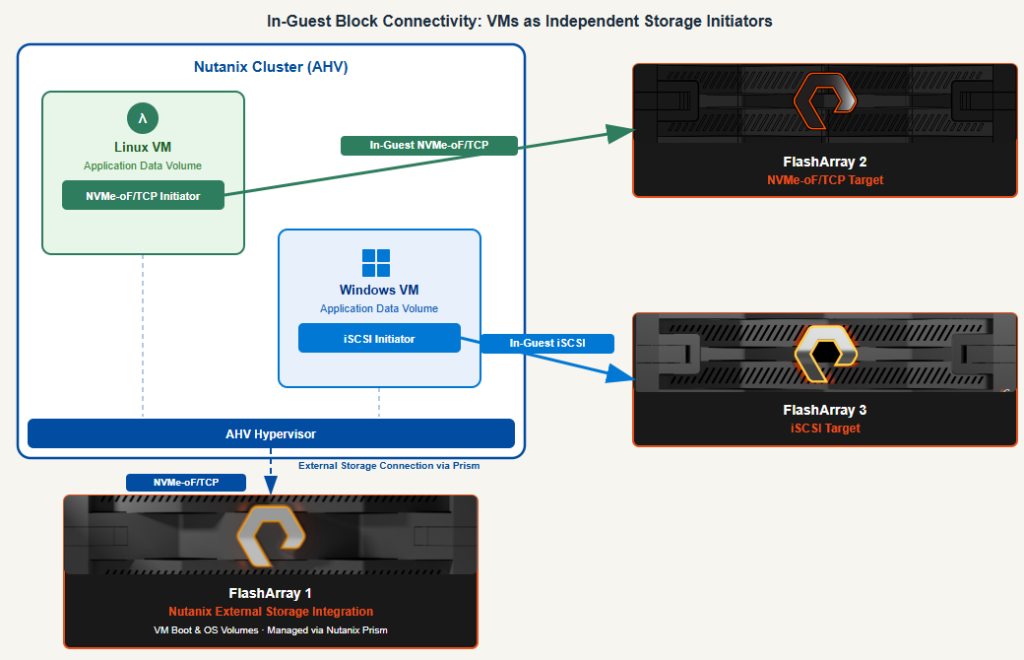
Figure 4: Example of Nutanix in-guest connectivity options.
This option is useful for database platforms and workloads where storage connectivity needs to exist inside the guest rather than through the hypervisor. It’s also a key option for NC2 and HCI environments where hypervisor-level FlashArray connectivity is not yet available. In those deployments, in-guest connectivity via NVMe-oF/TCP or iSCSI becomes the primary path for VMs and applications that need to consume FlashArray storage directly, regardless of what the underlying hypervisor or cloud infrastructure supports.
In this model, volumes are managed outside Prism, but they’re still able to utilize FlashArray data services, including data reduction, replication, protection groups, and SafeMode immutability. Clustered applications such as Microsoft WSFC can also be supported through FlashArray host groups containing the NQN or IQN identifiers for the participating VMs. This does not replace Prism-integrated FlashArray storage; the two approaches can coexist, with Prism-managed storage used for general VM workloads and guest-connected NVMe-oF/TCP or iSCSI reserved for specialized clustering requirements.
FlashArray and FlashBlade as shared storage platforms
The capabilities discussed here, including guest-connected block storage, shared file services, object storage, and PX-CSI, are all available today for Nutanix and Everpure customers, without requiring major architectural changes. More importantly, they complement standard Prism-integrated storage workflows instead of replacing them.
Regardless of whether your Nutanix environment is built around HCI, disaggregated compute, NC2, Kubernetes, or some combination of them, Everpure can operate as more than just external block storage for a single cluster. It becomes a centralized enterprise storage platform spanning clusters, protocols, and workload types while delivering consistent storage services across the environment.
These are the integration points worth exploring if the goal is to maximize the value of both Nutanix and Everpure working together.
Further reading and implementation guides
Ready to check out these integration points in your own environment? Dig into the technical mechanics with these step-by-step guides from the Everpure Support Portal (login required):
- Deploying in-guest block storage (iSCSI and NVMe-oF/TCP):
- iSCSI best practices for Windows Server and FlashArray: Best practices including registry updates, MPIO session values, and timeout parameters needed for a resilient Windows guest setup
- Configure Linux hosts for iSCSI/multipath connectivity: Complete walkthroughs for tailoring iscsi-initiator-utils and device-mapper-multipath configuration rules on Linux endpoints
- Overview of NVMe-oF/TCP connectivity: Technical architecture and transport configurations for leveraging high-performance NVMe over TCP within modern enterprise Linux distributions
- Configuring shared file services (NFS and SMB):
- Setting up file services on FlashArray: A comprehensive guide on using the FlashArray system to provision file virtual interfaces (VIFs), configure directory services (Active Directory/LDAP), and manage multi-protocol export policies for seamless Windows and Linux network shares
- FlashArray file services core overview: Foundations for provisioning native unified file spaces, resource quotas, and access rule logic directly on top of the Purity operating platform
Learn more about Everpure and Nutanix
Extend Your Nutanix Infrastructure with Everpure
FlashArray integrates seamlessly with Nutanix to deliver unified block, file, and object storage capabilities—all with the Purity management experience.