


This blog on Dremio S3 and NFS integration was originally published on Medium. It has been republished with the author’s credit and consent.
In this blog, I’ll go over how you can use fast NFS and S3 from Pure Storage to power your Dremio Kubernetes deployments.
Dremio Distributed Storage
First, I change the distStorage section in the values.yaml file to reflect my S3 bucket, access and secret keys, as well as the endpoint of the Pure Storage® FlashBlade®:
distStorage:

type: aws

aws:

bucketName: "dremio"

path: "/"

authentication: "accessKeySecret"

credentials:

accessKey: "PSFB...JEIA"

secret: "A121...JOEN"

extraProperties: |

<property>

name>fs.s3a.endpoint</name>

<value>192.168.2.2</value>

</property>

<property>

<name>fs.s3a.connection.ssl.enabled</name>

<value>false</value>

</property>

<property>

<name>dremio.s3.compat</name>

alue>true</value>

</property>

<property>

<name>fs.s3a.path.style.access</name>

true</value>

</property>
With the above in place, I deploy to my Dremio namespace using the following helm command:
~/dremio-cloud-tools/charts/dremio_v2$ helm install dremio ./ -f values.yaml -n dremio
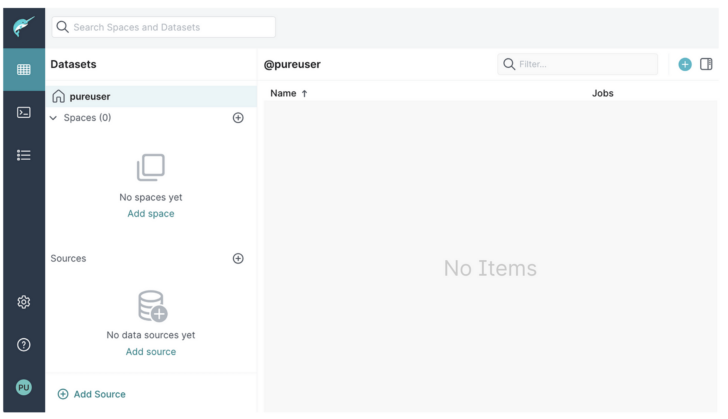
Once the pods are up and running, I can connect to the webUI on the service port, and after creating the admin account, I’m presented with the Dremio interface:
Let’s take a moment to check what has been created in the S3 bucket I specified for the distStorage:
$ aws s3api list-objects-v2 --bucket dremio --profile fbstaines03 --no-verify-ssl --endpoint-url=https://192.168.40.165

InsecureRequestWarning,

{

"Contents": [

{

"LastModified": "2023-08-09T15:19:58.000Z",

"ETag": "d41d8cd98f00b204e9800998ecf8427e",

"StorageClass": "STANDARD",

"Key": "accelerator/",

"Size": 0

},

{

"LastModified": "2023-08-09T15:19:58.000Z",

"ETag: "d41d8cd98f00b204e9800998ecf8427e",

"StorageClass": "STANDARD",

"Key: "downloads/",

"Size": 0

},

{

"LastModified": "2023-08-09T15:19:58.000Z",

"ETag: "d41d8cd98f00b204e9800998ecf8427e",

"StorageClass": "STANDARD",

"Key": "metadata/",

"Size": 0

},

{

"LastModified": "2023-08-09T15:19:58.000Z",
ETag": "d41d8cd98f00b204e9800998ecf8427e",

"StorageClass":"STANDARD",

"Key": "scratch/",

"Size": 0

},

{

"LastModified": "2023-08-09T15:20:43.000Z",

"ETag": "d41d8cd98f00b204e9800998ecf8427e",

"StorageClass": "STANDARD",

"Key": "uploads/_staging.dremio-executor-0.dremio-cluster-pod.dremio.svc.cluster.local/",

"Size": 0

},

{

"LastModified": "2023-08-09T15:20:33.000Z",

"ETag": "d41d8cd98f00b204e9800998ecf8427e",

"StorageClass": "STANDARD",

"Key": "uploads/_staging.dremio-executor-1.dremio-cluster-pod.dremio.svc.cluster.local/",

"Size": >0

},

{

"LastModified": "2023-08-09T15:19:57.000Z",

>"ETag": "d41d8cd98f00b204e9800998ecf8427e",

"StorageClass": "STANDARD",

"Key": >"uploads/_staging.dremio-master-0.dremio-cluster-pod.dremio.svc.cluster.local/",

"Size": 0

},

{

"LastModified": "2023-08-09T15:19:58.000Z"

"ETag": "d41d8cd98f00b204e9800998ecf8427e",

"StorageClass""STANDARD",

"Key": "uploads/_uploads/",

"Size": 0

}

]

}
Official documentation: The distributed storage cache location contains accelerator, tables, job results, downloads, upload data, and scratch data. Within my output the uploads/_staging… objects correspond to the nodes deployed for my test Dremio cluster.
Dremio S3 Source
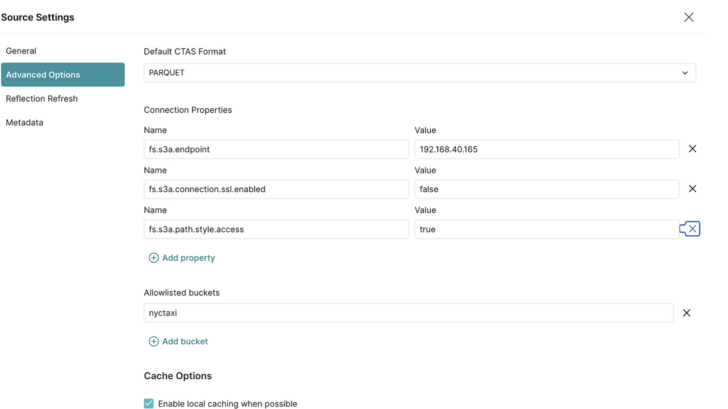
I then add an S3 source and provide my FlashBlade S3 user access and secret keys, as well as the required additional parameters:
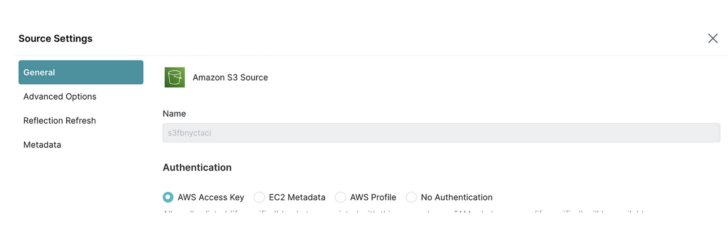
Note: I unchecked “encrypt connection” on the S3 General page. Also, fs.s3a.path.style.access can be true|false.\
I quickly check the first 10 rows of data with a simple SQL query:
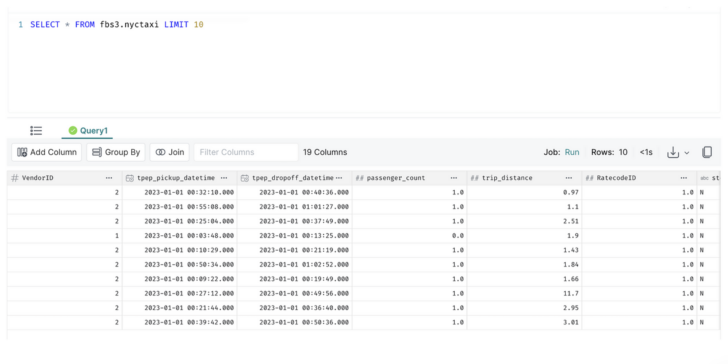
New objects have been created on the distributed storage bucket:
$ aws s3api list-objects-v2 --bucket dremio --profile fbstaines03 --no-verify-ssl --endpoint-url=https://192.168.40.165

/usr/lib/fence-agents/bundled/urllib3/connectionpool.py:1050: InsecureRequestWarning: Unverified HTTPS request is being made to host '192.168.40.165'. Adding certificate verification is strongly advised. See: https://urllib3.readthedocs.io/en/1.26.x/advanced-usage.html#ssl-warnings

InsecureRequestWarning,

{

"Contents": [

...

{

"LastModified": "2023-08-09T17:17:25.000Z",

"ETag": "dc4c0576740d2528518cac2ca40ff85a",

"StorageClass": "STANDARD",

"Key": "metadata/26752429-ab57-467d-a786-dd6a1c66a8b8/metadata/00000-3d2c0450-2715-45da-a5ba-4779e34801fc.metadata.json",

"Size": 5858

},

{

"LastModified": "2023-08-09T17:17:24.000Z",

"ETag": "7e931afe5a5b2a2b6196d69d8b46275a",

"StorageClass": "STANDARD",

"Key": "metadata/26752429-ab57-467d-a786-dd6a1c66a8b8/metadata/2cf233b4-4655-4598-89c5-94344c7cd0f1.avro",

"Size": 6849

},

{

"LastModified": "2023-08-09T17:17:25.000Z,

"ETag": "89feb5b9357dd8ff2d052880fcca72a7",

"StorageClass": "STANDARD",

"Key": "metadata/26752429-ab57-467d-a786-dd6a1c66a8b8/metadata/snap-7017972300860934048-1-3e6e8b78-baee-4755-8bc4-98b7f20ab28f.avro",

"Size": 3771

},

{

"LastModified": "2023-08-09T17:21:25.000Z",

"ETag": "b1a981d365063dc7a3e61d0864747a2f",

"StorageClass": "STANDARD",

"Key": "metadata/81ceabb1-20ba-427b-a507-f6c2243588a0/metadata/00000-495d50d3-3215-4f70-ae08-d3f181ae32e2.metadata.json",

"Size": 5858

},

{

"LastModified": "2023-08-09T17:21:25.000Z",

"ETag": "f40aba5c86cfc4bde487f6640edb724b",

"StorageClass": "STANDARD",

"Key": "metadata/81ceabb1-20ba-427b-a507-f6c2243588a0/metadata/da2a415e-40be-47d9-ac81-4522bf612928.avro",

"Size": 6849

},

{

"LastModified":"2023-08-09T17:21:25.000Z",

"ETag": "df3b02ffce0bb4dfddc7a048fb6c800c",

StorageClass": "STANDARD",

"Key": "metadata/81ceabb1-20ba-427b-a507-f6c2243588a0/metadata/snap-3982440809221282401-1-89be0606-7152-4326-96ba-43dd7849b978.avro",

"Size": 3770
},

...

]

}

Modern Hybrid Cloud Solutions
Seamless Cloud Mobility
Unify cloud and on-premises infrastructure with a modern data platform.
Dremio Metadata Storage
Dremio documentation states that HA Dremio deployments must use NAS for the metadata storage. It also provides guidance on the NAS storage characteristics: low latency, high throughput for concurrent streams as a must-have. This is exactly what Pure Storage FlashBlade sets out to do!
Now the helm chart executor template already assigns a PVC volume for the $DREMIO_HOME/data mount point. In my case, the PVC is being provisioned from FlashBlade NFS storage:
- name: {{ template "dremio.executor.volumeClaimName" (list $ $engineName) }}

mountPath: /opt/dremio/data
To simulate a shared volume, I change the mountPath line in the template and edit the helm chart values.yaml adding the following additional volume section for the executors:
extraVolumes:

-name:metadremio

nfs:

server:192.168.2.2

path:/metadremio

extraVolumeMounts:

-name:metadremio

mountPath:/opt/dremio/data
I check our volume is mounted on our executors:
$ kubectl -n dremio exec -it dremio-executor-0 -- df -kh

...

192.168.2.2:/metadremio 50G 0% /opt/dremio/data

...

I add several more NYCTAXI data set parquet files to my S3 bucket and let Dremio “discover” these additional files. I now have 55,842,484 rows of data.
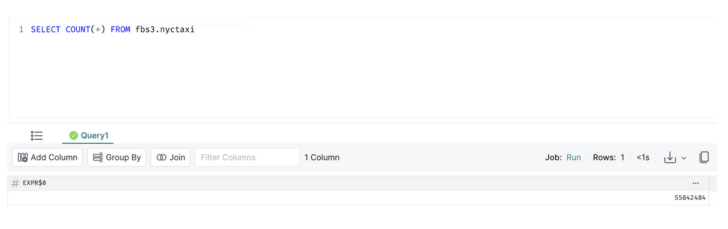
After running some queries, the new metadata volume shows an increase in used space:
$ kubectl -n dremio exec -it dremio-executor-0 -- df -kh
...

192.168.40.165:/jbtdremio  50G 149M  50G  1% /opt/dremio/data

...
Conclusion
That covers the current three possible Dremio integrations with S3 or NFS storage. As shown, Pure Storage FlashBlade provides the performance and concurrency required with seamless S3 and NFS capabilities to power a Dremio environment.
Read More from This Series

Cloud Data Security Challenges, Part 1: Gaining Visibility

Cloud Data Security Challenges, Part 2: Reducing Complexity

Cloud Data Security Challenges, Part 3: Getting Control
Make Cloud Economics Work
Easily deploy VMware in the cloud with enterprise-grade data protection, while saving up to 40% on costs.


