


This is the fourth and final part of a four-part series on using Everpure ActiveDR to protect, test, and fail over Oracle databases without taking production offline.
- Part 1: Configure Everpure ActiveDR and protect your database volumes
- Part 2: Access the database volumes at the DR site and open the database
- Part 3: Run non-disruptive DR drills with simple scripting
- Part 4: Controlled and emergency failovers and failbacks (this post)
Part 1 covered configuring Everpure ActiveDR. Part 2 covered building a DR database from the replicated volumes. Part 3 covered non-disruptive DR testing — which should meet most regulatory requirements for drill frequency on its own. This part covers what happens when a drill becomes the real thing.
Real disaster events are rare, but they do happen, usually at the least convenient time. Whether the cause is human error, hardware failure, or a natural disaster, having a tested, well-understood procedure is what turns a crisis into a manageable incident. Two scenarios are covered below: a controlled failover, planned in advance for something like scheduled electrical work, and an emergency failover, triggered by an unplanned outage.
Controlled failovers with Everpure ActiveDR
In this scenario, an outage is known in advance — electrical work, a hardware refresh, or similar and the goal is to run the business from the DR site while that work happens at the primary site. Everpure Evergreen eliminates risk from storage upgrades specifically, but a controlled failover is also useful for server-level, network, or other planned maintenance.
The goal is zero data loss. The steps are:
- Clean shutdown of production applications and database services.
- Demote and quiesce the Oracle-PROD pod to ensure all data has been replicated.
- Promote the Oracle-DR pod.
- Start the DR database services and applications.
This can be done in the Everpure FlashArray console and on the command line, but most teams will want to automate it with an orchestration tool or scripts. Sample shell scripts are available in Everpure’s GitHub examples repository at:
https://github.com/PureStorage-OpenConnect/oracle-scripts
Important: all scripts are provided as-is without warranty or formal support. Review, adapt, and test in non-production environments and validate against internal standards before production use.
Starting state: Database and applications running at the production site, with replication flowing from the promoted Oracle-PROD pod to the demoted Oracle-DR pod.

A script such as dr_controlled_failover.bash, run from the DR host, can drive the whole process by calling the production host and array for each of the four steps above.
On the production host, cleanly shut down the database services and demote the production pod:
# Stop the production database
srvctl stop database -d PROD -o immediate

# Dismount production ASM diskgroups (as the grid user)
sudo su - grid -c 'echo "alter diskgroup REDO dismount force;" | sqlplus -s / as sysasm'
sudo su - grid -c 'echo "alter diskgroup DATA dismount force;" | sqlplus -s / as sysasm'
sudo su - grid -c 'echo "alter diskgroup FRA dismount force;" | sqlplus -s / as sysasm'

# SSH to the production array to demote the production pod
ssh everpureuser@${PROD_FA_IP} "purepod demote --quiesce oracle-prod-fa1"
The time it takes to start the database environment is the time it takes to get DR started:
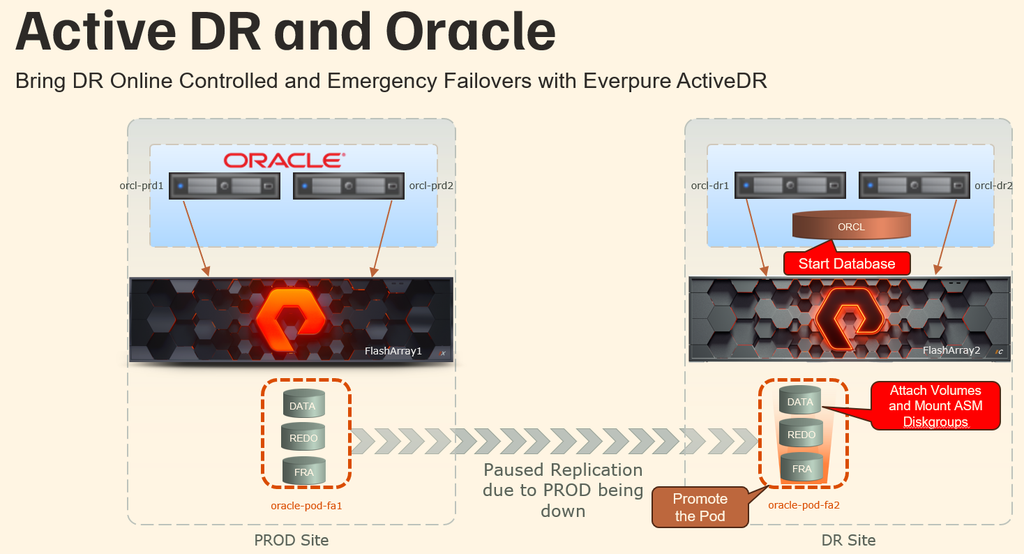
The quiesce option ensures all data has replicated to the Oracle-DR pod before both pods settle into a synchronized, read-only state.
On the DR host, promote the DR pod and start the DR database services:
# SSH to the DR array to promote the DR pod
ssh everpureuser@${DR_FA_IP} "everpurepod promote Oracle-DR"

# Mount DR ASM diskgroups (as the grid user)
sudo su - grid -c 'echo "alter diskgroup ADR_REDO mount force;" | sqlplus -s / as sysasm'
sudo su - grid -c 'echo "alter diskgroup ADR_DATA mount force;" | sqlplus -s / as sysasm'
sudo su - grid -c 'echo "alter diskgroup ADR_FRA mount force;" | sqlplus -s / as sysasm'

# Start the database
srvctl start database -d ACTDRDBS
Most of the time spent waiting is for the database to start, the rest is very fast. The business is now running at the DR site, and replication direction has automatically reversed — changes made at DR now replicate back to production.

That’s the entire failover: beyond the database shutdown/startup commands, it comes down to two calls — demote a pod, promote a pod. To fail back to the production site, a script such as dr_controlled_failback.bash runs essentially the same commands in reverse.
Emergency failovers with Everpure ActiveDR
In this scenario, production has an unplanned outage and the priority is getting the business running again at the DR site as quickly as possible.
Circumstances vary, but whatever the cause or severity, the DR pod can be promoted at any time to bring mission-critical services back up in minutes.
Everpure ActiveDR is asynchronous replication. That’s a benefit for long-range replication, since there’s no performance penalty on writes, and it delivers a near-zero RPO — typically single-digit seconds under normal operating conditions with sufficient replication bandwidth. This means some in-flight transactions could be lost in an unplanned outage, though Oracle’s own mechanisms handle rolling back uncommitted transactions. For a zero-RPO requirement, Everpure ActiveCluster provides bi-directional synchronous replication between FlashArray systems within metro-area range.
With that in mind, here’s how to handle the most common failure scenarios:
Complete primary data center loss (natural disaster)
Promote the DR pod to resume operations from the DR site. Remove the original replication link and configure a new one to re-protect data on a different FlashArray. Without access to another FlashArray, consider snapshotting the database volumes to an on-premises NFS target or an S3 bucket.
Primary data center outage caused by a power failure
Promote the DR pod to resume operations from the DR site. If the primary site outage is temporary, data added at the DR site resyncs back to production automatically once the production array is available again and the production pod is demoted.
Loss of network connectivity between sites
No action is required. Replication data queues, and once connectivity resumes, the queued data writes to the destination.
Hardware failures (servers, switches, storage)
Everpure FlashArray systems have a strong track record for availability. If the array itself is still available and the failure is at the server or network level, follow the controlled failover steps above. If the FlashArray system itself is unavailable, follow the steps for a primary data center power outage.
These are the main scenarios to prepare for. A tested, published, well-understood plan is what makes the difference in a high-pressure situation, and Everpure FlashArray replication — whether ActiveDR or ActiveCluster — is built to keep that plan simple.