


Autofs, also known as automounter, is a program designed to mount NFS shares. You can use it to mount Pure Storage® FlashBlade® NFS shares on demand whenever they’re accessed rather than having to maintain the mounts all the time. You can also use it to unmount filesystems after a period of inactivity on the mount, freeing up valuable system resources.
Keep reading for a walkthrough of using autofs to manage access to FlashBlade NFS shares for use with Oracle Recovery Manager (RMAN) and Oracle Direct NFS (dNFS).
autofs Installation
Install the autofs package.
[oracle@z-rac1 ~]$ sudo yum install autofs
This will create a number of files in /etc which you can see using ls -ls /etc/auto* for example:
conf
-rw-r--r--. 1 root root   795 Mar 30 11:37 /etc/auto.master
-rw-r--r--. 1 root root   524 Mar 30 11:37 /etc/auto.misc
-rwxr-xr-x. 1 root root  1260 Mar 30 11:37 /etc/auto.net
-rwxr-xr-x. 1 root root   687 Mar 30 11:37 /etc/auto.smb
The /etc/auto.master is the main configuration file and includes example mapping between mount points and a map file containing definitions of the remote filesystems that can be mounted.
Create Automounter Map
We can now create an automounter configuration for the NFS mount point and required timeout. Note: The file must end in .autofs otherwise it will be ignored.
[oracle@z-rac1 ~]$ sudo vi /etc/auto.master.d/fbnfs.autofs
Below is my file for my NFS mount of /mnt/orabkup referencing a map file called auto.fbnfs with a timeout of 180 (the default value is 300 seconds).
/mnt/orabkup /etc/auto.fbnfs --timeout=180
Create Map File
Below is a FlashBlade NFS share I’ve created as a destination for my Oracle RMAN backups.
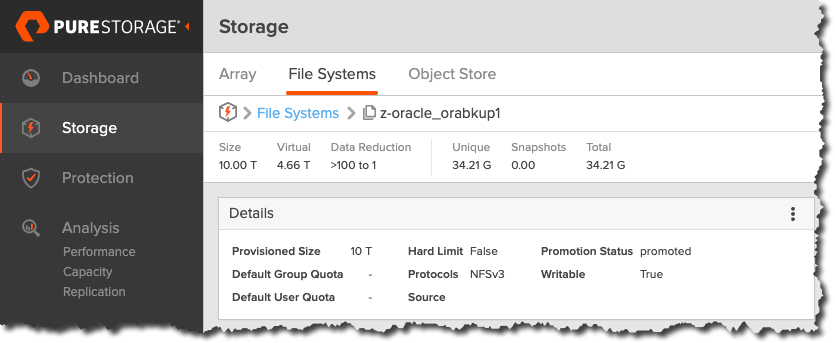
To create the map file, I’ve provided my mounting options, the FlashBlade IP address, and FlashBlade (NFS) file system name.
[oracle@z-rac1 ~]$ sudo systemctl enable --now autofs
Created symlink from /etc/systemd/system/multi-user.target.wants/autofs.service to /usr/lib/systemd/system/autofs.service.
This file can contain multiple mount points and shares as required. Just add additional lines. For example:
[oracle@z-rac1 ~]$ sudo systemctl status autofs
● autofs.service - Automounts filesystems on demand
   Loaded: loaded (/usr/lib/systemd/system/autofs.service; enabled; vendor preset: disabled)
   Active: active (running) since Fri 2021-05-07 11:17:43 BST; 2min 1s ago
 Main PID: 27080 (automount)
    Tasks: 6
   CGroup: /system.slice/autofs.service
           └─27080 /usr/sbin/automount --systemd-service --dont-check-daemon

May 07 11:17:43 z-rac1.uklab.purestorage.com systemd[1]: Starting Automounts filesystems on demand...
May 07 11:17:43 z-rac1.uklab.purestorage.com systemd[1]: Started Automounts filesystems on demand.
Access Mount Point
Before we try to access the mount point, let’s check it:
[oracle@z-rac1 ~]$ df -h /mnt/orabkup
Filesystem       Size  Used Avail Use% Mounted on
/etc/auto.fbnfs     0     0     0    - /mnt/orabkup
Now let’s move into the automount directory and repeat.
[oracle@z-rac2 orabkup]$ cd ORCL
[oracle@z-rac2 ORCL]$ ls -l
total 369087576
-rw-r----- 1 oracle dba      34358697984 Nov 18 09:58 data_D-ORCL_I-1568428048_TS-IOPS_FNO-10_g5vfqpb8
-rw-r----- 1 oracle dba      34358697984 Dec 15 15:54 data_D-ORCL_I-1568428048_TS-IOPS_FNO-10_glvi58m8
...
If we repeat for our DEMO mount point, we can see this also gets automounted.
[oracle@z-rac2 DEMO]$ df -h
192.168.4.100:/z-oracle_orabkup1   10T  446G  9.6T   5% /mnt/orabkup/ORCL
192.168.4.100:/z-oracle_orabkup    10T  7.8T  2.3T  78% /mnt/orabkup/DEMO
Check autofs Auto unmount
Now let’s check the autofs unmount is working.
oracle@z-rac1 ~]$ date; df -h | grep ORCL
Fri  7 May 15:40:25 BST 2021
192.168.4.100:/z-oracle_orabkup1   10T  2.7T  7.4T  27% /mnt/orabkup/ORCL
[oracle@z-rac1 ~]$
And wait…
[oracle@z-rac1 ~]$ date; df -h | grep ORCL
Fri  7 May 15:50:51 BST 2021
[oracle@z-rac1 ~]$
And as if by magic, the mount has disappeared.
autofs and Oracle RMAN
What about RMAN? Can it use the automounter?
Good news: When the Oracle RMAN process tries to write to the NFS mount point, autofs detects the access and mounts the NFS share automatically as expected.
[oracle@z-rac1 ~]$ df -h
Filesystem                        Size  Used Avail Use% Mounted on
192.168.4.100:/z-oracle_orabkup1   10T  125G  9.9T   2% /mnt/orabkup/ORCL
autofs and Oracle dNFS
Can Oracle dNFS work with autofs mounted NFS filesystems, without an /etc/fstab entry? Yes, Oracle can use the /etc/mtab -> /proc/self/mounts to see the active NFS share mounted by autofs and use it.
[oracle@z-rac1 ORCL]$ cat /proc/self/mounts | grep ORCL
192.168.4.100:/z-oracle_orabkup1 /mnt/orabkup/ORCL nfs rw,relatime,vers=3,rsize=524288,wsize=524288,namlen=255,soft,proto=tcp,timeo=600,retrans=2,sec=sys,mountaddr=192.168.4.100,mountvers=3,mountport=2049,mountproto=udp,local_lock=none,addr=192.168.4.100 0 0
Let’s use some of the dNFS views I’ve previously blogged about to confirm Oracle dNFS is in use.
$ cat $ORACLE_HOME/dbs/oranfstab

server: flashblade1
local: 192.168.4.2 path: 192.168.4.100
local: 192.168.5.2 path: 192.168.5.100
local: 192.168.6.2 path: 192.168.6.100
local: 192.168.7.2 path: 192.168.7.100
nfs_version: nfsv3
export: /z-oracle_orabkup  mount: /mnt/orabkup/DEMO
export: /z-oracle_orabkup1 mount: /mnt/orabkup/ORCL
SQL> SELECT distinct svrname, path FROM v$dnfs_channels;
SVRNAME          PATH
---------------- -----
flashblade1      192.168.4.100
flashblade1      192.168.5.100
flashblade1      192.168.6.100
flashblade1      192.168.7.100
SQL> SELECT svrname, dirname, wtmax, rtmax FROM v$dnfs_servers;

SVRNAME      DIRNAME             WTMAX  RTMAX
------------ ------------------  ------ ------
flashblade1  /z-oracle_orabkup1  524288	524288

Disconnected from Oracle Database 19c Enterprise Edition Release 19.0.0.0.0 - Production
Version 19.10.0.0.0
Summary
In this post, I’ve shown:
- You can use autofs to automatically mount and unmount FlashBlade filesystems.
- Autofs can detect when Oracle RMAN is requesting access to an NFS filesystem and mount the filesystem on demand.
- Autofs can detect that the NFS filesystem is no longer required by RMAN and unmount the NFS share.
- Oracle Direct NFS detects that RMAN is using an NFS share configured for use with dNFS and uses it.

Optimize Your Oracle Environment
Reduce costs, increase performance, and simplify management with Pure solutions.