Summary
VMware Live Site Recovery with the Everpure Storage Replication Adapter delivers high‑performance, cost‑efficient disaster recovery and migration from on‑premises VMware environments to hyperscaler clouds like Amazon Elastic VMware Service.


After a recent announcement from Broadcom, VMware Live Site Recovery (formerly VMware Site Recovery Manager) with array-based replication (SRA integration) is allowed and supported in hyperscaler cloud environments, such as Amazon Elastic VMware Service (EVS) and others. For more information, see the Broadcom FAQs.
VMware Live Site Recovery (VLSR) integrates with third-party storage array-based replication through a storage replication adapter (SRA). In this blog post, I’ll focus on such use cases and how to leverage the Everpure SRA for array-based replication from an on-premises FlashArray™ to Everpure Cloud connected to EVS (data center to cloud) or between EVS deployments in a full public mode DR infrastructure (region to region).
Why does this matter?
Disaster recovery from the data center to the public cloud has been an attractive idea since the outset of public cloud, but only recently has it become truly feasible with this newly supported DR architecture.
1. Kill the Idle Compute Tax
Traditional DR requires you to keep enough servers running at the DR site to handle the “landing” of your data. With external storage, the storage is not trapped inside the server. You can deploy a “pilot light” environment with little to no compute active during steady-state. When a disaster strikes, you simply spin up the CPUs and point them at the existing, ready-to-go storage volumes. You stop paying for “just in case” compute.
2. Efficiency That Scales: Global Data Reduction
Network bandwidth is often the biggest bottleneck in DR. Everpure changes this with global data reduction. Because the data is fully deduplicated and compressed at the source (on-premises) and remains reduced throughout the journey to the cloud, you are only sending unique blocks over the wire.
- Small Footprint: Drastically lower cloud storage costs.
- Multiple Recovery Points: Since only changes are stored, keeping 30 days of “snapshots” doesn’t mean 30x the cost.
3. Choose Your Speed: Zero RPO vs. Async
Every application has a different “tolerance for pain.” External storage gives you a dial to tune your resilience:
- ActiveCluster™: Achieve Zero RPO and Zero RTO for mission-critical apps using synchronous active-active clustering.
- ActiveDR™: Provides continuous asynchronous replication for near-zero RPO over any distance, ensuring minimal data loss without the latency tax of synchronous links.
4. No Rehydration, No Waiting
The biggest “gotcha” in cloud DR is the rehydration wait. Most backup-centric tools store data in a “cold” format that must be converted or moved before a VM can actually use it. With Everpure, the DR storage target is the production-grade storage the VMs run on.
The result: There is no performance overhead or “warm-up” period. Your VMs boot instantly on high-performance flash-optimized storage.
5. Seamless Orchestration with VMware Live Recovery
Complexity is the enemy of recovery. This entire workflow integrates natively with VMware Live Recovery Manager (formerly Site Recovery Manager). This isn’t a new, unproven “connector”—it’s a battle-hardened integration that automates the entire failover and failback process. With a single click, the manager handles the networking, the storage mounting, and the VM power-on sequence in the correct order.
What is a storage replication adapter (SRA)?
In general, a storage replication adapter (SRA) is a software component that enables VMware Live Site Recovery (VLSR) to integrate with and control array-based storage replication for disaster recovery (DR) purposes. SRAs act as a bridge between VLSR and the underlying storage systems, allowing VLSR to leverage the storage array’s native replication capabilities for the purpose of disaster recovery orchestration.
An SRA is essential for integrating VLSR with underlying storage replication technologies. It automates and orchestrates storage replication for disaster recovery, providing a seamless way to protect data and ensure business continuity. By using SRAs, organizations can efficiently manage their DR plans with minimal manual intervention, ensuring that critical applications and workloads can be recovered quickly and reliably.
How a storage replication adapter works
- Replication setup: You configure the replication between storage arrays (production and recovery) using the SRA. This includes setting up replication schedules, defining replication levels (e.g., synchronous or asynchronous), and managing replication pairs.
- During failover: When a disaster event occurs, VLSR communicates with the SRA to initiate the failover process. The SRA ensures that the replication between the primary and secondary storage arrays is consistent, and VLSR orchestrates the recovery of virtual machines.
- During failback: After the primary site is restored, the SRA facilitates the process of synchronizing the data between the recovery site and the primary site to ensure that data is consistent and up to date when workloads are moved back.
- Replication monitoring: The SRA also provides monitoring capabilities for the replication process, allowing administrators to track the status of replication and ensure that data is being replicated successfully.
Everpure FlashArray Storage Replication Adapter
VMware Live Site Recovery integrates with the FlashArray SRA to orchestrate array‑based replication rather than host‑based copies. Protection groups and recovery plans in VLSR remain identical regardless of whether the underlying FlashArray or Everpure Cloud replication is asynchronous or uses ActiveDR™ or ActiveCluster™. The SRA abstracts those details and simply exposes replicated datastores and their consistency groups to VLSR.
Using the FlashArray SRA gives you flexibility:
- You can dial in the desired RPO/RTO per application by choosing async, ActiveDR, or (where applicable) ActiveCluster at the storage layer, without changing your VLSR runbooks or recovery workflows.
- Operators get one consistent DR orchestration experience—the same recovery plans, tests, and failover/failback procedures—while storage teams retain freedom to evolve replication policies or move between on‑prem and Everpure Cloud with EVS as requirements change.
Everpure replication value in detail (ActiveDR and more)
FlashArray has three main replication options, plus snapshot offload, each aimed at a different RPO/RTO and distance profile. Everpure Cloud is powered by the same Purity replication engine as FlashArray, so you can choose the right data plane behavior for each workload while keeping a consistent management experience.

Figure 1: VLSR protection groups and recovery plans stay consistent whether replication is asynchronous, ActiveDR™, or ActiveCluster™ across FlashArray and Everpure Cloud.
Asynchronous replication
Asynchronous replication is periodic, snapshot‑based replication between arrays that uses protection groups (pgroups) or per‑volume schedules. Asynchronous replication sends only deltas between snapshots. The typical use cases are:
- Classic DR between data centers (on-prem/cloud) at any distance
- Cost‑effective near‑term recovery and secondary copies
- Data migration to another FlashArray or to Everpure Cloud
ActiveDR (near‑synchronous continuous replication)
ActiveDR delivers continuous, near‑sync replication between arrays using pods, which ship batches of writes almost continuously rather than relying just on snapshots. The use cases are:
- Need for low RPO DR (seconds) where zero RPO is not required, but no host latency penalty is desired
- Multi‑site DR where ActiveCluster cannot be used due to distance
ActiveCluster (synchronous, active‑active replication)
ActiveCluster provides fully synchronous, active‑active replication using stretched pods, allowing hosts to read and write the same volume from either array with identical volume identities. A typical use case is:
- Business continuity/HA for mission‑critical workloads needing zero RPO and near‑zero RTO
How they differ (at a glance)
| Feature/Metric | Async Replication | ActiveDR | ActiveCluster |
| Replication type | Periodic snapshot‑based | Continuous near‑sync (batches of writes) | Fully synchronous per‑write mirroring |
| Topology | FA ↔ FA*/EC** | FA ↔ FA/EC | FA ↔ FA, EC ↔ EC |
| Granularity | Volume / pgroup | Pod | Pod (stretched) |
| Typical RPO | Minutes (≥ ~5 min) | Seconds (< ~30 s) | 0 |
| Typical RTO | < ~60 s | < ~60 s (manual promote) | 0/transparent |
| Host latency impact | None | None | Hosts see WAN latency |
| Distance profile | Any distance (bandwidth‑limited) | Any distance (bandwidth‑limited) | Metro/campus (<~11 ms RTT) |
| Primary use | DR, migration, warm standby | Low‑RPO DR | HA/business continuity |
*FA: FlashArray
**EC: Everpure Cloud
Configuring VLSR with FlashArray SRA
Configuration of VLSR with SRA is easy and straightforward and involves the following steps:
- Pair the sites together (both sites need to have their own running vCenter and VLSR instance).
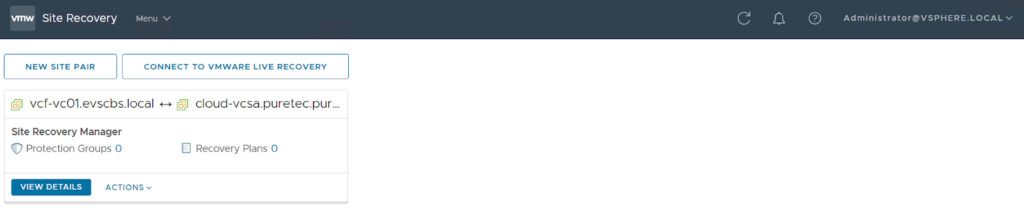
- Install SRA on both VLSR instances and connect local and remote arrays (in our case, on-prem FlashArray and cloud to Everpure Cloud).

- In the Purity GUI, on the primary array, create a volume, and enable and configure replication with the secondary array.

- Now you can see your volume is discovered and visible under “Array Pairs” in VLSR.

At this time, we’re ready to create a protection group and recovery plans and run a test migration.
Test Scenario
There are several supported configurations for disaster recovery/migration scenarios with VLSR. For example: on-prem ↔ on-prem, cloud ↔ cloud, on-prem ↔ cloud.
For our tests, we’ll leverage an on-premises FlashArray connected to a local VMware vSphere cluster and an Amazon Elastic VMware Service cluster with a connected Everpure Cloud array on the other side. The network configuration is already established, as both sites are visible through the existing site-to-site VPN tunnel.
The first step is to create a protection group and then a recovery plan within VLSR. It’s common to confuse these two, but they serve different roles in your DR strategy:
- Protection group defines which VMs are protected (a VM must be in a protection group before it can be recovered) and what replication technology to use.
- Recovery plan is the master script. It contains one or more protection groups and dictates the order in which they power on, IP customization, and any pre/post-power-on scripts.
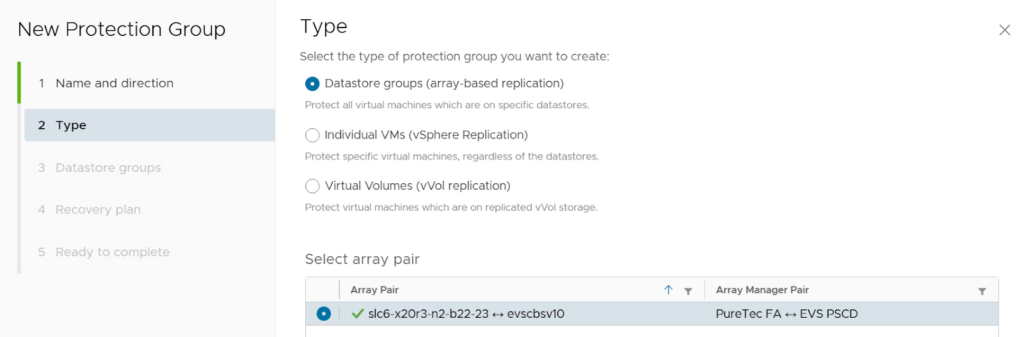
With the FlashArray SRA, we’ll leverage array-based replication, which means the whole datastore, including all VMs on it, is protected (replicated).
After you create a Recovery Plan, click the Run button, select Planned migration, and confirm.
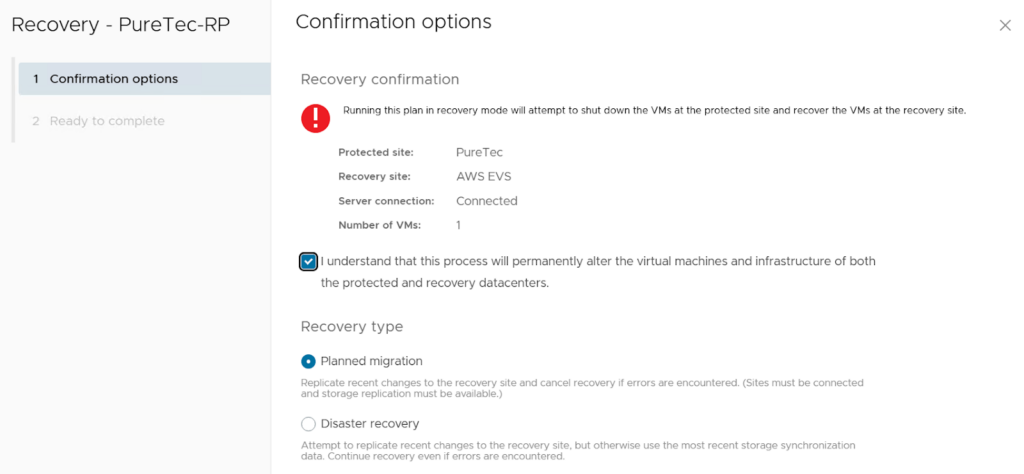
Monitor the progress of the recovery steps until they‘re complete.
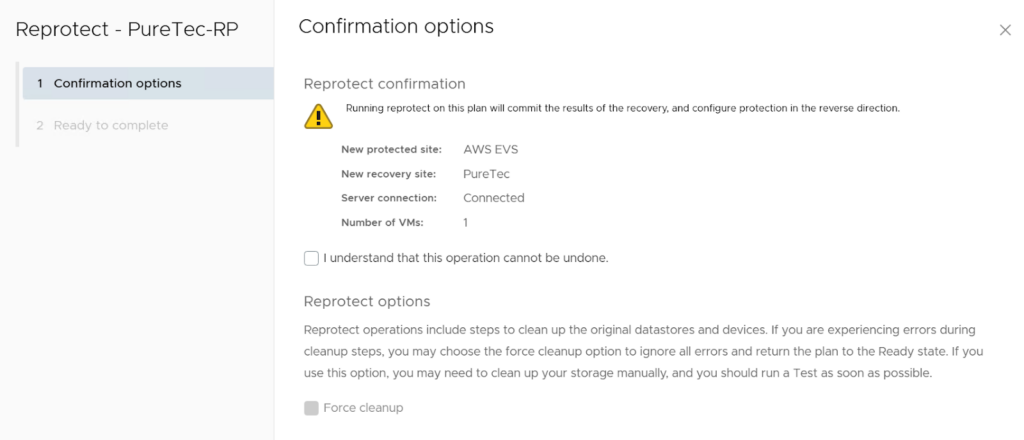
After the recovery is complete, do not forget to reprotect the target site (it will clean up the original datastore and placeholder VMs and configure replication in the reverse direction).
Conclusion
VMware Live Site Recovery (VLSR) now supports seamless on-premises to cloud disaster recovery (DR) through official integration with the storage replication adapter (SRA) within hyperscaler environments. This approach utilizes array-based replication via an SRA, which offers superior, high-performance DR capabilities. This is accomplished by offloading data movement to an array, thereby leveraging hardware-accelerated features such as deduplication and snapshots to maintain virtual machine (VM) performance.
Everpure enhances hybrid cloud business continuity by providing tested, reliable migration pathways, exemplified by the successful scenario of transitioning workloads from an on-premises FlashArray to a cloud-based Everpure Cloud array. A comprehensive range of Everpure replication types is available to satisfy diverse requirements: ActiveCluster for zero-RPO high availability, ActiveDR for near-synchronous low RPO, and asynchronous replication for long-distance migration.
FAQ
What is VMware Live Site Recovery (VLSR)?
VMware Live Site Recovery (formerly Site Recovery Manager) is a disaster recovery orchestration tool that automates failover and failback between protected environments using storage or hypervisor-based replication.
What is a Storage Replication Adapter (SRA)?
A Storage Replication Adapter (SRA) enables VMware Live Site Recovery to integrate with array-based replication, allowing it to control failover and recovery using the storage system’s native replication capabilities.
How does array-based replication differ from host-based replication?
Array-based replication offloads data movement to the storage system, leveraging snapshots and hardware acceleration, while host-based replication operates at the hypervisor level and can introduce additional overhead.
Can VMware Live Site Recovery be used for on-prem to cloud disaster recovery?
Yes. With supported SRA integration, VMware Live Site Recovery can orchestrate disaster recovery from on-premises environments to hyperscaler-based VMware services such as Amazon Elastic VMware Service (EVS).
What are the benefits of using FlashArray replication with VLSR?
FlashArray replication provides flexible RPO/RTO options, including asynchronous replication, ActiveDR, and ActiveCluster, while maintaining consistent recovery workflows within VLSR.
What is the difference between ActiveDR and ActiveCluster?
ActiveDR provides near-synchronous replication with low RPO measured in seconds, while ActiveCluster delivers fully synchronous, active-active replication with zero RPO for mission-critical workloads.
Is VMware Live Site Recovery suitable for data migration as well as disaster recovery?
Yes. In addition to orchestrating DR, VLSR can be used for planned migrations between data centers or from on-premises environments to cloud deployments.
Deepen Your Disaster Recovery Replication Strategy
Go beyond configuration basics and learn when to choose async, near-sync, or sync replication to match your RPO, RTO, and latency needs.