

If your company’s data is like gold, then Pure Storage is your vault. It’s your last line of defense after an attacker has already breached several layers of security. But how do you ensure your vault is locked and has the proper security measures in place?
Building on last year’s launch, the Pure1® new Data Protection Assessment now delivers that peace of mind with deeper visibility, smarter automation, and integrated threat defense. Teams can proactively harden arrays, detect irregular behaviors sooner, and remediate faster with precise, vendor‑approved guidance. And with new updates last month, those capabilities are even more powerful.
What’s New: September 2025 Updates
We’ve been leveling up assessments in Pure1 over the last year, with a number of recent additions at Pure//Accelerate 2025:
- Centralized CVE intelligence and guidance: Move beyond scanner noise with Pure’s centralized CVE intelligence and Pure1‑driven remediation steps tailored for managed appliances (e.g., upgrade to specific Purity versions). Pure introduced a dedicated CVE database and clarified how Pure1 delivers actionable vulnerability insights, mapping exposures to precise remedial steps (e.g., specific Purity versions) for safer appliance operations.
- AI Copilot and MCP integration: The Pure Intelligent Control Plane and Pure1 AI Copilot gained broader capabilities, including natural-language operations with MCP integration, helping admins manage fleets, workloads, and security posture more intuitively. Use natural language to query and manage your Pure fleet, with richer context and workflow orchestration spanning storage and adjacent platforms.
- Security ecosystem integrations: New integrations include CrowdStrike Threat Graph and Falcon next‑gen SIEM for real-time threat evaluation and automated policy response, plus Superna for real-time file/user monitoring to detect exfiltration and double-extortion behavior.
- Pure Protect Recovery Zone innovations: Pure Protect Recovery Zones (clean rooms) enable non-disruptive recovery validation and remediation in isolated environments to accelerate clean recovery without impacting production. Veeam partnerships advance cyber-resilience-as-a-service with centralized protection and recovery SLAs.
What Are Pure’s Leading Practices for Data Resiliency?
Leading practices establish a baseline configuration that can be improved upon depending on several factors. Pure’s leading practices for data resiliency are to take snapshots at least once per day and retain those snapshots for seven days.
SafeMode™ is then layered on top of this to prevent manual eradication of these snapshots. We recommend at least a seven-day eradication delay or duration (depending on FlashArray or FlashBlade). Increasing the number of snapshots of course will give you more timepoints to recover your data and can mean that only a few minutes’ or hours’ worth of data is lost rather than an entire day’s worth.
Longer retention periods can buy you time for situations that may take days before anyone notices there’s a problem. It’s up to your organization to determine the ideal configuration which also needs to be balanced against the capacity requirements of such snapshot configurations. Thankfully, Pure1 provides capacity planning that will help give you an idea of these requirements.
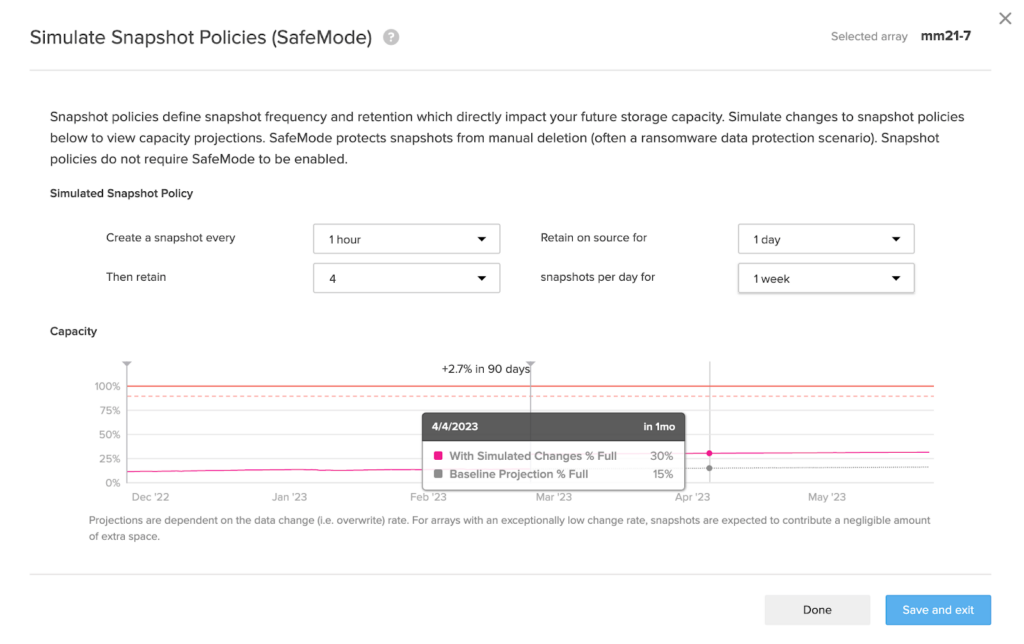
Snapshots are great, but they’re subject to one major flaw: They can be deleted, or in Pure Storage terms, destroyed. A destroyed snapshot will be recoverable for a period of time but can also be eradicated, meaning it’s no longer recoverable. Think of eradication as manually emptying the recycle bin or trash on your desktop. This can happen by accident or maliciously by a ransomware attacker trying to ensure your data can’t be recovered and that the ransom is paid.
SafeMode: An Added Layer of Protection
That’s why FlashArray and FlashBlade offer another layer of protection with SafeMode. SafeMode prevents the manual eradication of your snapshots, which means they cannot be deleted by accident or by malicious wrongdoers until the eradication delay has lapsed. Not even an administrator can bypass SafeMode once it’s enabled. Multiple validations are required by Pure’s support teams to disable or reduce your eradication delay.
Our leading practice with SafeMode is to set an eradication delay of at least seven days, but we recommend fourteen days or more. The reason for such a long eradication delay is that it’s possible for several days to lapse before a problem is detected. That could be because the system is infrequently used or the operator is out over the weekend or on vacation. The longer the eradication delay is set, the better your chances are for recovering your data. Thanks to the granularity of SafeMode, you can enable this protection for your entire array or per protection group or object.
Not only can Pure1 help understand the storage implications of these data protection measures, but it can also help ensure that your data is protected per these leading practices.
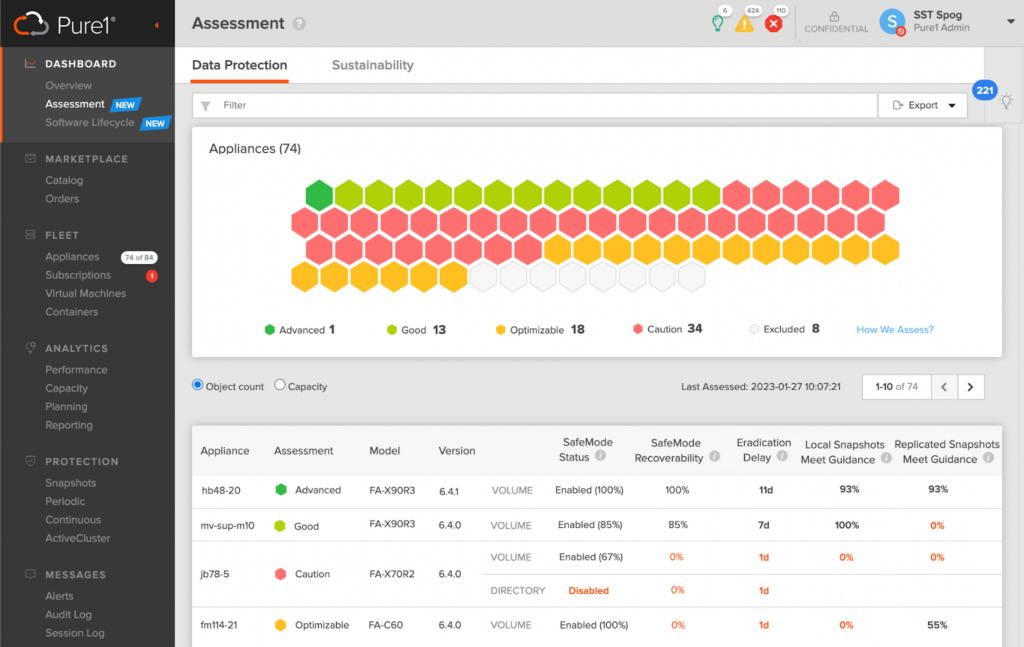
Whether you have one array or an entire fleet, the new Pure1 Data Protection Assessment will give you a detailed breakdown of your data resiliency. This includes ensuring that your snapshots and SafeMode configurations meet or exceed our leading practices and even considers replication for added resiliency.
How the Pure1 Data Protection Assessment Works
The Security Assessment continuously evaluates your fleet against leading practices and modern threat behaviors. It correlates telemetry with learned baselines to flag irregular patterns—spikes in latency, shifts in data reduction, unexpected changes in volume/snapshot counts—and now expands into admin behavior anomalies and proactive notifications to accelerate triage.
It complements the Data Protection Assessment, which aligns snapshot, replication, and SafeMode configurations to Pure leading practices and provides actionable recommendations, reporting, and object‑level insights for volumes, file systems, directories, and buckets—helping you prioritize what to protect and how deeply.
Watch a demo of the new Data Protection Assessment in action.
All Pure Storage® appliances are categorized based on the level of protection in place.
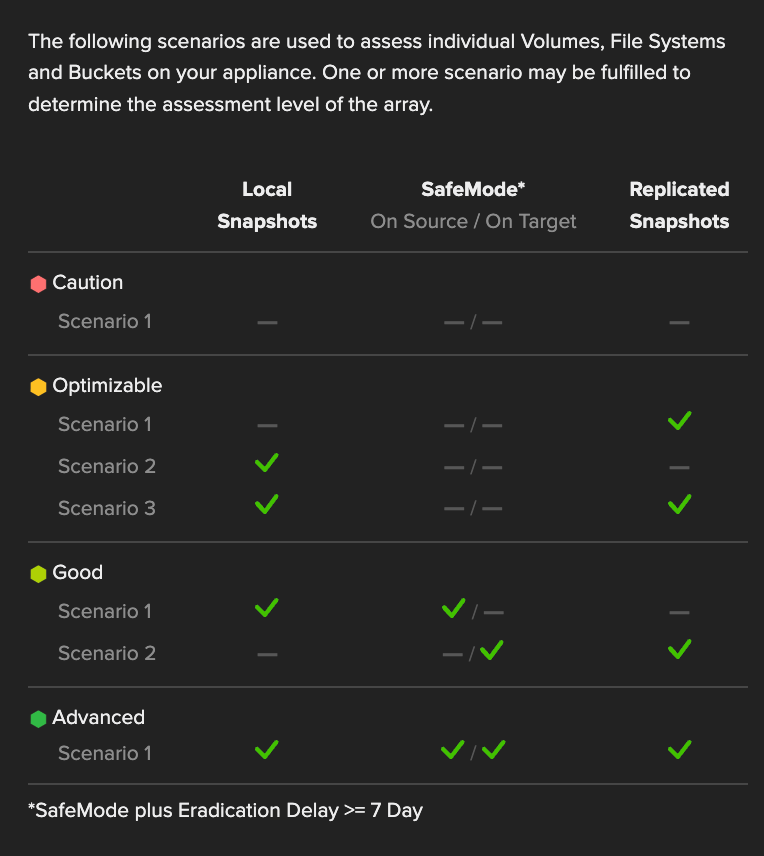
Caution means that snapshot policies don’t meet our leading practices (or don’t exist), and therefore, data on these arrays should be considered at risk. Even if SafeMode is enabled, there are no snapshots to protect. Optimizable arrays have basic protections in place such as local snapshots or replication through ActiveDR™, ActiveCluster™, protection group replication, or policy. Good indicates arrays that either have local snapshots with SafeMode or replication to another array with SafeMode enabled. The advanced category is reserved for high achievers that have both local and replicated snapshots or ActiveCluster enabled with SafeMode protections in place. Consider this configuration for your most critical data. Arrays not requiring additional protection can be excluded from the assessment.
If your arrays fall into the first two categories, then don’t worry. The Pure1 Data Protection Assessment will provide actionable recommendations to help you configure data protection policies. Recommendations include freeing up additional capacity for snapshots, upgrading Purity to a version that supports SafeMode, as well as the configuration of snapshot policies and SafeMode eradication delay.
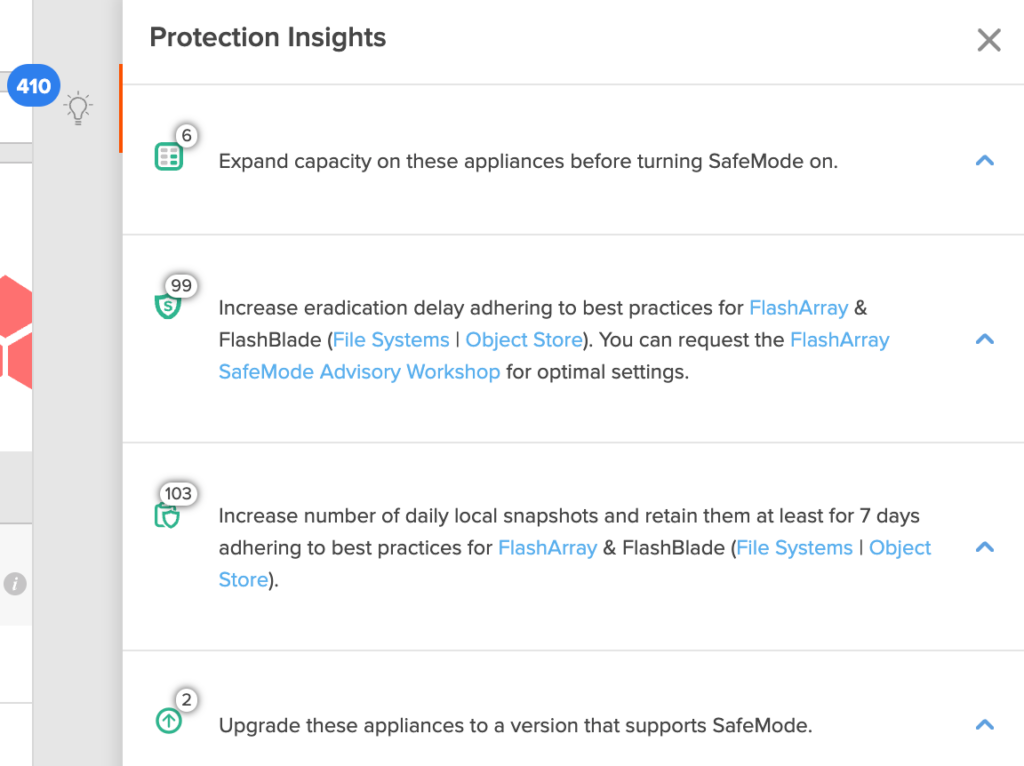
For customers who want to be selective about what gets protected, the Pure1 Data Protection Assessment also grants insight into your FlashArray and FlashBlade objects.

Per-object SafeMode in FlashArray can give you the control you need to better balance capacity requirements with data resiliency but at the cost of additional management. The Pure1 Data Protection Assessment reduces the operational overhead by giving you a breakdown of your volumes, file systems, directories, and buckets. That way, you can quickly identify your most important objects and ensure they’re configured to your data resiliency needs. Plus, this data can be exported from Pure1, including object-level details for further reporting, analysis, or project planning.
Get Started Today
Start by watching the Assessing Your Security (Pure1) Pure360 demo to see how the assessment surfaces insights, recommendations, and anomalies in one place. Then, log in to Pure1 and review your fleet’s Security Assessment and Data Protection Assessment scores; subscribe to anomaly notifications and audit your SafeMode approval policies. Consult the CVE database and use Pure1 guidance to remediate exposures safely on managed appliances.
For more information, check out the Pure1 documentation (login required) or visit the Pure1 product page.re information, check out the Pure1 documentation (login required) or visit the Pure1 product page.
Discover Pure1
Learn more about this and other assessments available in the Pure1 app.